In 2020 I made many voxel models of varying degrees of complexity. Some highly stylized little ships, some giant robots. However, voxel editors can only do so much, and animation is not possible (at least in Magicavoxel).
So I began importing my voxel models to Blender, a free Maya alternative I’ve used for nearly 8 years now. Unfortunately, there were a few problems.
Ephtracy, brilliant though they are, did not build an amazing .obj exporting feature into Magicavoxel. The geometry generated was pretty bad, and each object required individual editing to fix errant topology.
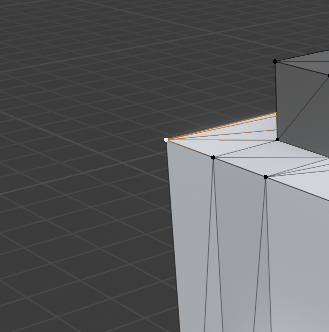
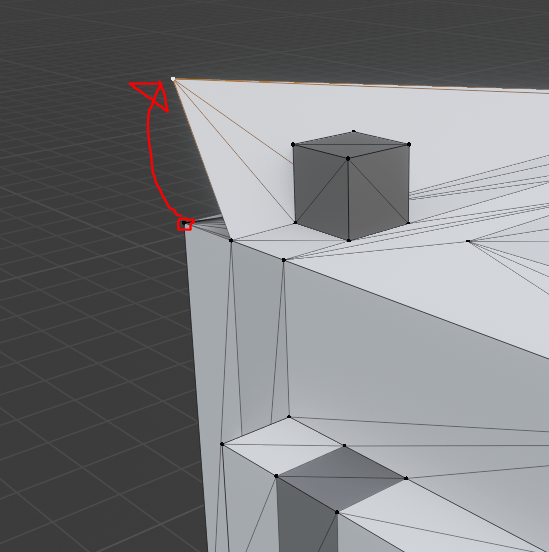
Here’s an example: the corner of this mesh is disconnected, and also a duplicate vertex! This can make for bad calculations of normals, which will mess up shading and possibly cause z-fighting among redundant geometry. Not ideal!
There’s also the problem of marching cubes. When exporting from Magicavoxel, marching cube voxel shapes are only supported in .ply and .mc formats, but in both cases, models lose their textures when imported into other engines. These formats also suffer from sub-optimal geometry problems.
Enter MeshLab, a free tool that can do… well… basically anything to meshes.
The tool is open source and extremely powerful, but not very user friendly. It took a TON of fiddling with different options to get something that exports consistently. And if you have a Magicavoxel scene with a ton of objects, you’ll be stuck clicking through the same options on MeshLab (or Blender) over and over.
I’ve created Vox2Obj to ease this process, and the results are excellent. For each object in your scene, the manual MeshLab process can take upwards of a minute, even with a practiced hand. With Vox2Obj, the meshes are optimized in a few seconds per object.
Take this model for example:
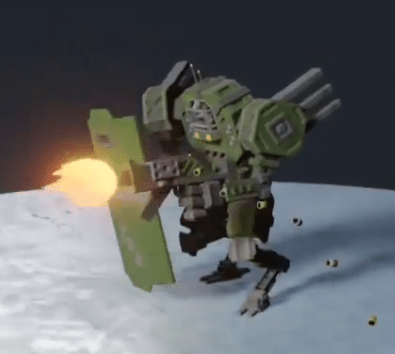
This guy has 33 moving parts! At a minute each, you’re looking at over half an hour of clicking through menus and typing file names. With Vox2Obj, you’re on your way in seconds.
And believe me, that geometry optimization is amazing. Along with marching cube functionality and baked-in textures, you’d be crazy not to use it.

Here’s a before and after:

Usage documentation, code, and information on how to contribute are all located in the Vox2Obj Gitlab project.
Happy voxeling!
 The Clayton Wells Tech Blog